

Bid to schedule
The estimate becomes the budget and the resource plan
What you decide with it
Decisions you make with it, not after it
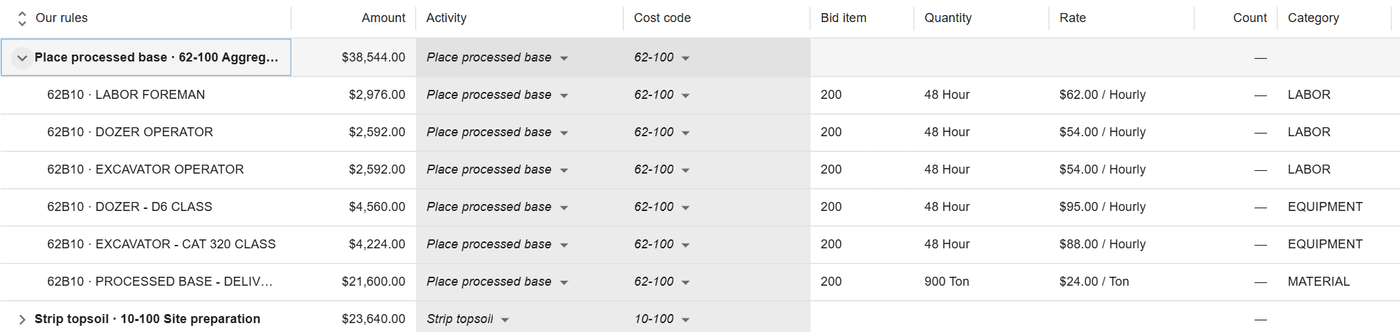
Which package each bid line belongs to
Rules from earlier bids propose an activity and a cost code for each line. A person accepts or changes them, and nothing is written until it is saved.
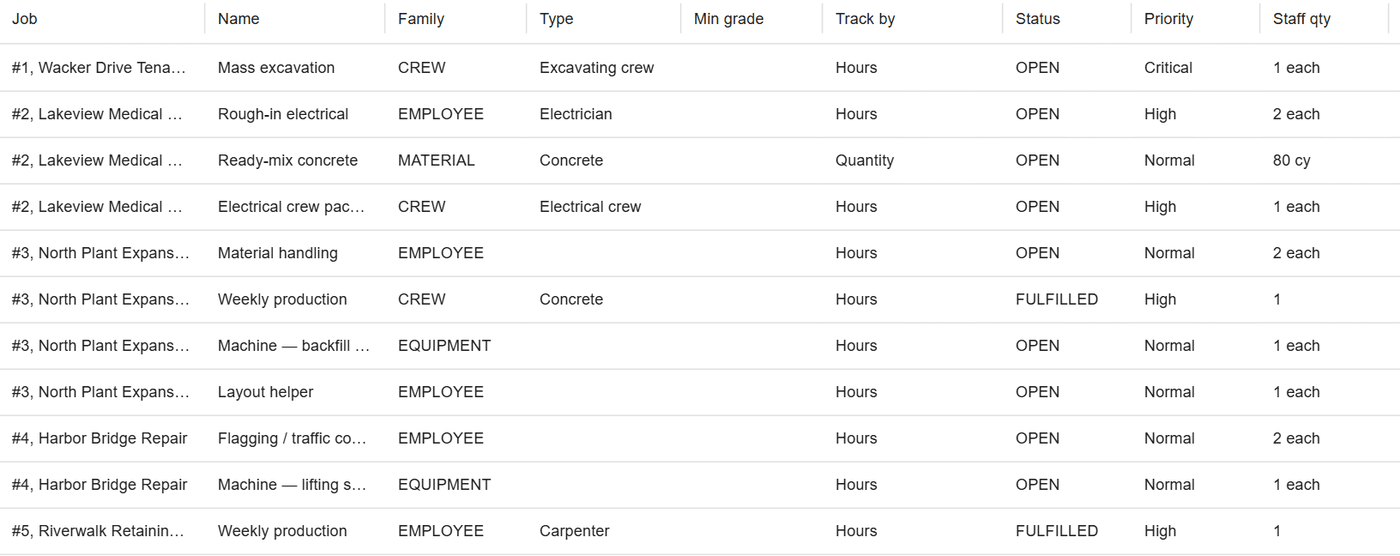
What the job needs on the board
Mapping writes the job’s needs by type and quantity, so open needs land on the board ready for the scheduler to fill.
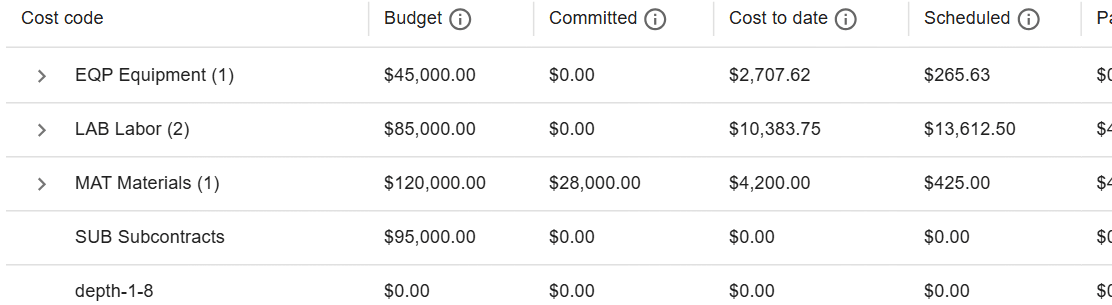
Whether the job will land on budget
The budget built from the bid foots to the bid, and job cost measures cost to date and projected final against it from the first day.
How it works
How it works
Import the bid
A HeavyBid detail cost report, a B2W Estimate export or an Excel bid workbook comes in at once. A file that does not foot, prices another job or states half a scope is refused.
Map lines to packages
A package is an activity and a cost code. Mapping rules built from bids you mapped before propose the package; when two rules disagree, the line waits for a person.
Build the budget and the needs
When the last line has a package, the budget and the needs are written together. Change orders and added scope stay apart from the base scope.
Re-import without losing work
A revised bid replaces the old one in place and keeps the mapping of every line it recognises. Hand edits to the budget win.
At a glance
Bid to schedule in ControlBoard®
| Platforms | Web |
|---|---|
| What it does | Imports the bid, maps its lines to work packages, and builds the budget and the needs |
| Who uses it | Estimators, project managers and schedulers |
| Works with | HCSS HeavyBid detail cost report; B2W Estimate; Excel bid workbooks |
Updated
It stays in step with
Questions people ask about bid to schedule
Common questions
Does ControlBoard import HCSS HeavyBid estimates?
What if our estimates are in Excel?
Does mapping a bid in ControlBoard have to be redone on every job?
What does a mapped bid build in ControlBoard?
More of ControlBoard
Scheduling
Labor, crews, equipment, subcontractors and material on one board, against each job's needs.
Dispatch and the field
The schedule to every phone by text, email or app, replies on the job's thread, trips and moves.
Time and payroll
Punch or type hours, the foreman's crew sheet, the office week, approve and lock, the payroll file.
Job cost
Budget, cost to date, committed, scheduled, cost to complete and projected final, by cost code.
Labor planning
Forecast hours and heads per job, the company labor plan, plan health and the booklet.
Equipment and compliance
Licenses and certifications, service plans, GPS, rentals with return due, and the tool crib.
Forms and daily logs
Your own forms and permits, the hazard library, and a daily log for every job-day.
Project management
RFIs and submittals with ball in court, job documents, and My PM work across every job.
Assistant
Answers from the help and your company's data, a brief for each screen, and forms from paper.