

Aerial view of excavators and haul trucks on a heavy civil earthwork site

Heavy civil

Heavy civil crews and iron on one board

ControlBoard® puts a heavy civil contractor’s crews, operators, machines, rentals and subcontractors on one board, so a scheduler sees every job and every conflict before the trucks roll. The schedule goes to the field on ControlBoard Field, moves and trips get the iron where it is needed by a deadline, and the foreman’s hours come back the same day. Approved time leaves as a payroll file, a HeavyBid estimate becomes the job’s budget and needs, and job cost shows the projected final cost while there is still time to act. Your accounting system stays the system of record.

Sound familiar?

Two superintendents want the same excavator on the same Tuesday.

The lowboy shows up, but nobody said which yard the dozer was in.

A rental runs past its return date and the late fee lands on the job.

The bid says 1,200 operator hours; nobody knows how many are left.

A day on ControlBoard

The day, from the yard to the pay week

5:30 AM

The day's board goes out

The scheduler checks today’s crews and machines by the hour, clears the last person or machine scheduled twice, and sends each person their job, start time and directions by text, email or ControlBoard Field.

Dispatch board: machine moves planned by date and time, with where each one goes next

9:00 AM

The iron moves

A move puts the dozer on a trip with a driver and a deadline. With Samsara connected, the office sees which machines are at their job, near it or away, without calling the yard.
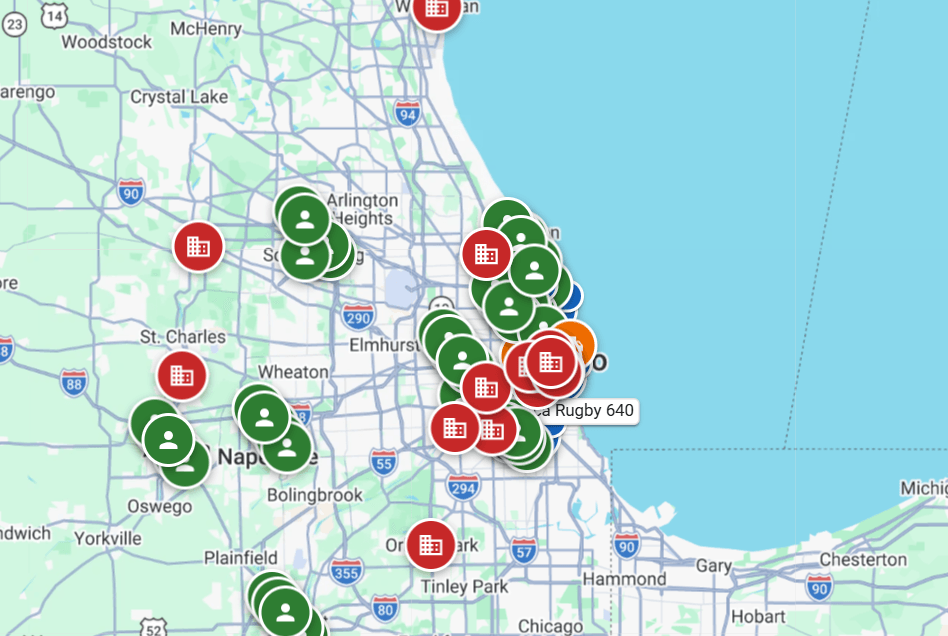
Machines on the map from telematics

3:30 PM

Hours and the day's record

The foreman keeps the crew’s hours, machine hours and the daily log on the phone. Quantities, delays, weather and photos are filed on the job, and a weak signal never loses the day.
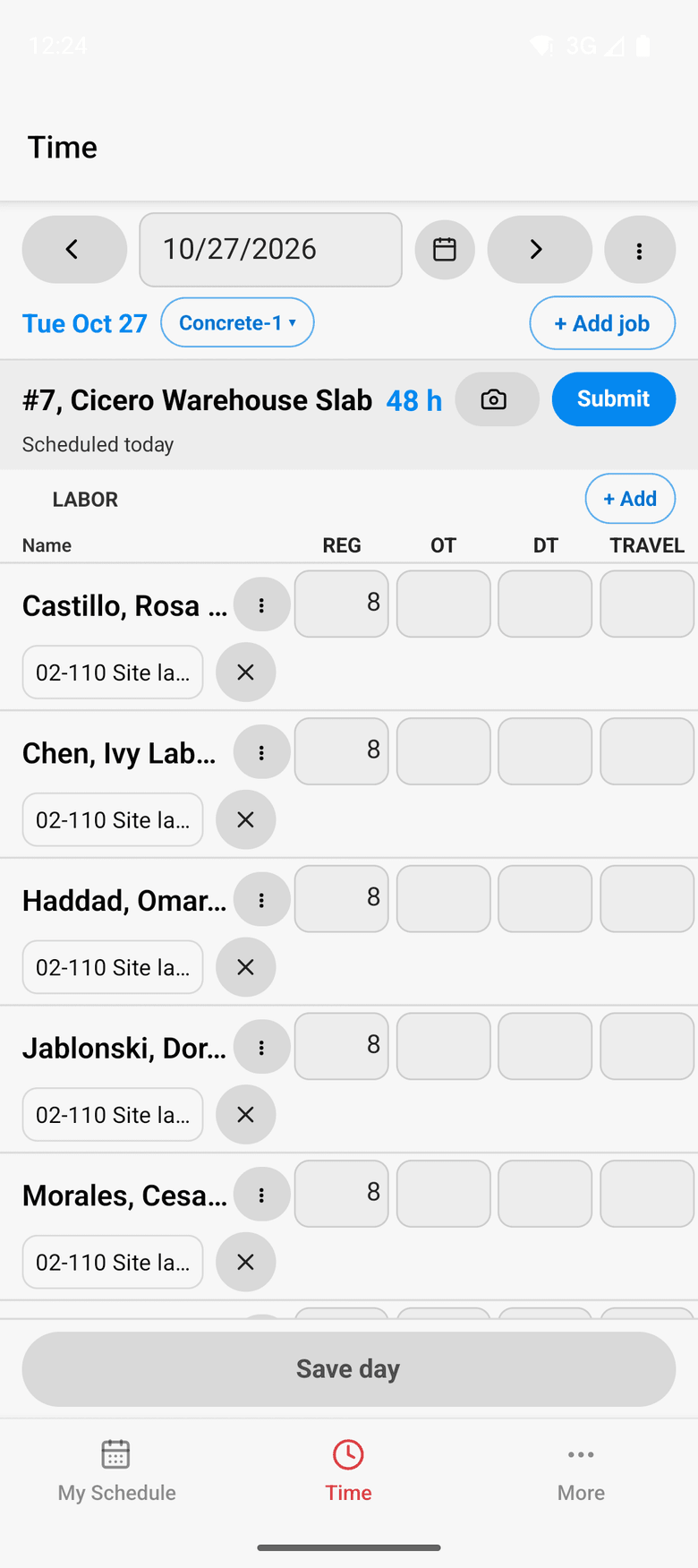
ControlBoard Field: the foreman's crew sheet

Friday

Approve the week, read the cost

The office approves each person’s week and locks it for payroll. Job cost compares budget, cost to date, committed and scheduled work, and shows where the job will land.
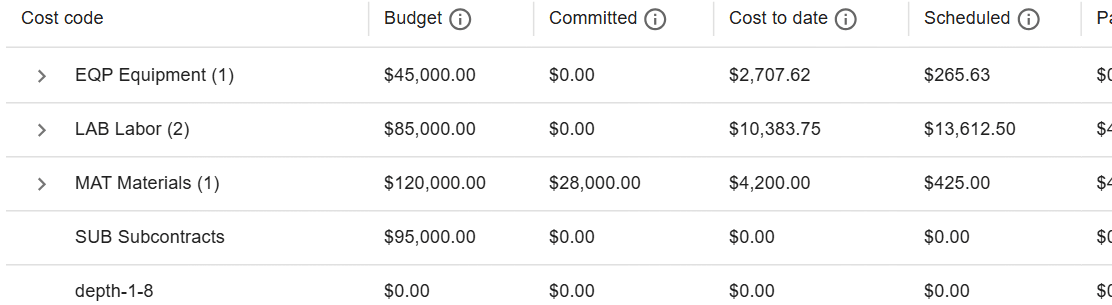
Part of a job's cost page: budget, committed, cost to date and scheduled cost by cost code

Heavy civil on ControlBoard®

Facts
Bid inHCSS HeavyBid detail cost report or an Excel bid, into budget and needs
FieldControlBoard Field for iPhone and Android: schedule, directions, messages, time clock, crew sheet, daily log
PricePublished, per person, from $4 a month
What goes on the boardLabor, crews, equipment, rentals, subcontractors and material
Who it is forHeavy civil, earthwork and site contractors that do their own work

The parts you will use

  • Scheduling: Labor, crews, equipment, subcontractors and material on one board, against each job's needs.
  • Dispatch and the field: The schedule to every phone by text, email or app, replies on the job's thread, trips and moves.
  • Time and payroll: Punch or type hours, the foreman's crew sheet, the office week, approve and lock, the payroll file.
  • Job cost: Budget, cost to date, committed, scheduled, cost to complete and projected final, by cost code.
  • Bid to schedule: HeavyBid, B2W or Excel bid in, lines mapped to work packages, budget and needs built in one step.
  • Equipment and compliance: Licenses and certifications, service plans, GPS, rentals with return due, and the tool crib.
  • Labor planning: Forecast hours and heads per job, the company labor plan, plan health and the booklet.

“Efficient, Intuitive, and Well-Supported—ControlBoard Delivers”

With ControlBoard, resources can be scheduled easily, and complex labor forecasts can be prepared, ensuring we run efficiently without hiccups or guessing.

Tomas Z, VP of OperationsPihl Excavating
Capterra review, 05/23/2025

Works with

Sage IntacctProjects, employees and their customers come in from Sage Intacct; approved hours and chosen project fields go back. Sage 100 ContractorA small read-only agent on your own server brings Sage 100 Contractor clients, jobs and employees in, on a schedule you set. Sage 300 CRECost codes, scopes and job-to-date cost come in from Sage 300 CRE exports; approved hours and standard items go back as a labor distribution file. ComputerEaseJobs, employees and the job-cost ledger come in from Deltek ComputerEase, read through its API on a schedule. ProcoreProjects, cost codes, people, vendors and equipment come in from Procore, so field scheduling runs on your Procore projects. HCSS HeavyBidA HeavyBid Detail Cost Report becomes the job's bid, then its budget and its resource needs once the lines are mapped. B2W EstimateA B2W Estimate export becomes the job's bid, then its budget and its resource needs once the lines are mapped. HCSS HeavyJobTime cards from HCSS HeavyJob come in, so hours your foremen keep in HeavyJob meet the schedule and job cost. SamsaraEngine hours, odometer, position and fuel come in from Samsara for the machines you already have. Cat VisionLinkWhere each Cat machine is comes in from VisionLink and shows on the map beside where it is scheduled. Komatsu KomtraxKomatsu machine locations come in from Komtrax and show on the map beside where each machine is scheduled. John DeereJohn Deere machine locations come in through a Deere sign-in and show on the map beside the schedule.

Common questions

Can ControlBoard schedule equipment and labor together for heavy civil work?
Yes. People, crews, machines, rentals, subcontractors and material are all resources on the same board. A machine booked on two jobs on the same day is marked as a conflict, so the scheduler settles it before the morning. Moves and trips sit beside the schedule, so getting the iron to the job is planned with the work rather than on a separate sheet.
Does ControlBoard work with HCSS HeavyBid?
ControlBoard reads the HeavyBid detail cost report. Each bid line is mapped to a cost code and activity once, and rules can propose the mapping on the next bid. The mapped bid builds the job’s budget and its labor and equipment needs in one step, so the estimate becomes the plan without retyping it.
Do we have to leave Sage to use ControlBoard?
No. Jobs, people and customers come in from Sage Intacct, or from Sage 100 Contractor through a small read-only agent on your server. Sage 300 CRE cost codes come in by file, and approved hours go back as a Sage 300 labor file. The ledger stays where it is, and ControlBoard keeps the schedule, the field and the day’s cost in step with it.
How do we know a rented machine is costing us money while it sits?
Each rental agreement carries its on-rent and off-rent dates, rate and fees. The equipment home view counts returns coming due and machines on rent but idle. With live GPS from Samsara, idle days are counted from engine hours, so the office can send a rental back before it runs over.

See ControlBoard® on your own jobs

A 20-minute call, then a demo built on your jobs, people and equipment. Your accounting system stays where it is.