

Compare
ControlBoard vs Workyard
Facts checked November 17, 2026 from public sources listed below.
Choose Workyard if
Specialty and general contractors whose first need is accurate time: continuous GPS, automatic clock-in at the job, crew clock-in by a supervisor, a simple planner in the same app, and free payroll integrations, with a 14-day trial.
Choose ControlBoard® if
Construction companies that schedule labor and equipment together, want open needs and capacity on the board, a labor forecast months ahead, job cost with a projected final, and a published price for every kind of user. It plans labor by trade from days to years ahead, and has an AI assistant built in.
Side by side
| ControlBoard® | Workyard | |
|---|---|---|
| What it is | Labor and equipment scheduling, field time and job cost | Workforce management for the field: GPS time tracking, a planner and forms |
| Scheduling | A drag-and-drop board by job, person or crew, with open needs and capacity | A daily and weekly planner, grouped by employee or project |
| Equipment on the board | Yes, with attachments, moves, trips and rentals | Not described on its site |
| Labor planning | Company labor plan by job or by trade, by day, week, month, quarter or year, saying what can be staffed and whom to hire; bids counted at their odds; job moves tried as what-if drafts | Not described on its site |
| Qualifications checked when scheduling | Yes: the board warns as you drop, with expiry notices | Not described on its site |
| Telling the field | One send by text, email or app per person, with a confirmation and two-way job threads | Schedules reach workers in the Workyard app; text and a confirmation are not described |
| Field time | Punch with the location read only at the punch, typed hours, foreman crew sheet, approval in up to three steps, payroll file | Continuous GPS, automatic clock-in at a geofence, crew clock-in, a kiosk and time card sign-off |
| Forms and daily logs | Daily logs, a form builder, hazard assessments, permits (Forms & Daily Logs add-on) | Smart Forms, an add-on with an AI form builder |
| Job cost | Budget, committed, cost to date and projected final by cost code (Job Cost add-on) | Hours by job and cost code, with live labor cost |
| AI | Built in: ask about jobs, people, the schedule or the labor plan in plain words; every answer shows the rows behind it and changes nothing | Time Assistant, announced in September 2026, on its Autopilot plans |
| Accounting and payroll | QuickBooks Online, Sage Intacct, Sage 100 Contractor, payroll files and more | QuickBooks, ADP, Gusto, Paychex, Paycor, Paylocity, Rippling, Sage, Foundation |
| Published prices | Yes, for every kind of user: from $4 a person a month; $110 for a scheduler | Plans start at $6 a user a month billed yearly; scheduling starts on the Pro plan, which shows no price |
Labor planning, from the day to the year
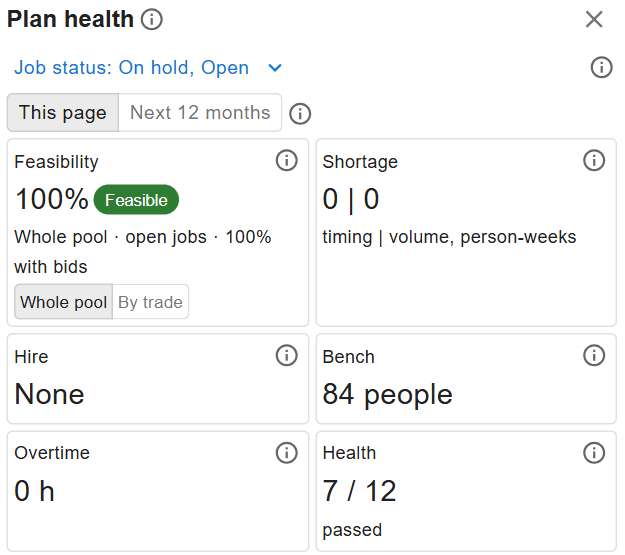
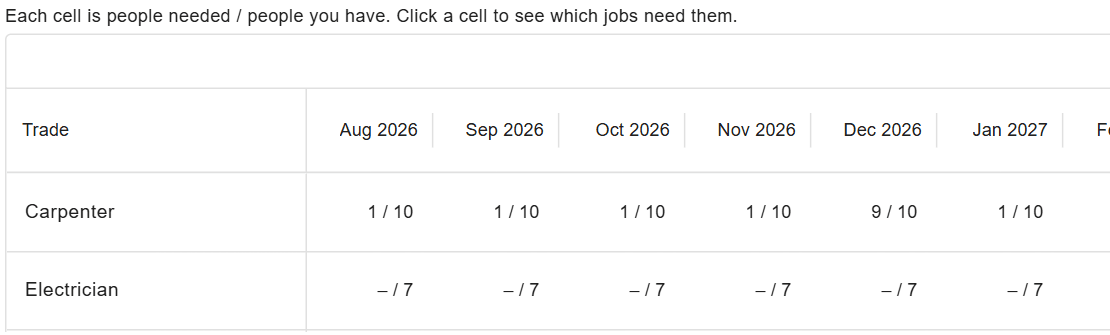
ControlBoard® forecasts each job’s labor and adds every job into one company labor plan, set against the people you have. It says how much of the work can be staffed, which weeks and trades are short, and whom to hire by when.
- By job or by trade, by day, week, month, quarter or year, in hours, people or crews.
- Each job forecast by trade, cost code or crew, spread from the bid or on a curve, with earned hours, hours to complete and projected final.
- What-if before you commit: count bids at their chance of winning or as if all are won, and try job moves as drafts to watch the shortage change before anything is saved.
- A baseline and a snapshot at each month close, so you can see how the forecast has drifted.

Common questions
Is ControlBoard a Workyard alternative?
Does Workyard schedule equipment?
How do prices compare?
Can ControlBoard forecast labor months or years ahead?
Sources
- Workyard home page, seen 2026-11-17
- Workyard contractor scheduling, seen 2026-11-17
- Workyard construction time tracking, seen 2026-11-17
- Workyard pricing, seen 2026-11-17
- Workyard launches Time Assistant (15 September 2026), seen 2026-11-17